


For enterprise IT project managers and solutions architects VMware migrations rarely fail because the technology does not work.
They fail because they take longer and cost more than anyone planned for. In 2026, that gap between plan and reality is more expensive than ever. Broadcom's licensing changes have compressed budgets, support deadlines are closing in, and the teams expected to execute the move are the same teams already running the business day to day.
This guide breaks down why VMware migration programs slip, what those delays actually cost, and how enterprise teams prevent them with better planning, visibility, and orchestration. It draws on the cost and risk framework in our companion piece, VMware Exit Strategy: Cost Model and Risk Mitigation Plan, and on what ReadyWorks has seen across real enterprise migrations.
Why VMware Migrations Slip
Almost every delayed migration traces back to the same root cause: teams cannot see the full picture before they commit to a plan. Siloed tools and limited visibility create blind spots that make migrations slower, riskier, and more expensive than they should be, with teams juggling VMware, Nutanix, CMDB, ITSM, and storage dashboards without a single source of truth (ReadyWorks VirtualReady). From that one weakness, a predictable set of problems follows:
- Incomplete inventory. Years of ad-hoc growth leave teams unsure which applications are critical, which VMs are oversized, or what is safe to decommission. Planning becomes guesswork.
- Hidden dependencies. Undiscovered links between systems surface mid-cutover, forcing rework, emergency rollbacks, and extended parallel operations.
- Manual coordination. Scheduling, stakeholder communications, and validation handled by spreadsheets and email do not scale across hundreds or thousands of VMs.
- Resource conflicts. Your best engineers already have full-time jobs. Stacking a complex migration on top of business-as-usual work creates burnout and bottlenecks.
- Underestimated lead times. Network, security, and compliance changes routinely take longer than planned and are rarely sequenced early enough.
Each issue is survivable on its own. Together, they turn a 12-month plan into an 18-month program and a controlled budget into an open-ended one.
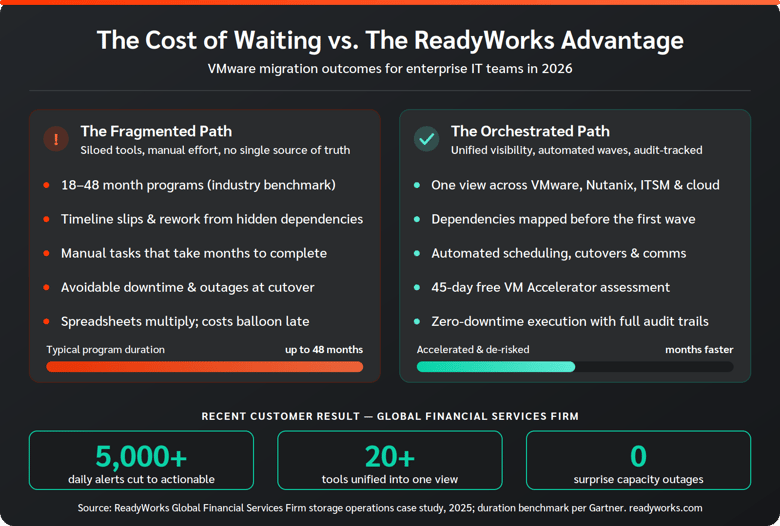
How fragmented, manual migrations compare to an orchestrated approach — and the results one enterprise achieved with ReadyWorks.
The Real Cost of a Delayed Migration
Delays are not just a scheduling inconvenience; they compound across every line of the budget. When leadership asks what a migration will cost, they are really asking for the full picture, including the cost of things going wrong (VMware Exit Strategy cost model). A slipping timeline drives cost in four ways:
- Extended licensing overlap. Every month you run old and new platforms in parallel, you pay for both — increasingly painful under subscription-based VMware pricing.
- Labor and backfill. Overruns mean overtime, contractor extensions, and backfill for staff pulled off other priorities.
- Rework and rollback. Failed cutovers consume the most expensive resource you have: senior engineering time, often at night and on weekends.
- Opportunity cost. A migration that drags on is a modernization roadmap that stalls and a team that cannot focus on higher-value work.
The point is not to scare leadership with worst-case numbers. It is to show that preventing delay is the single highest-leverage cost control in the entire program.
Five Ways to Prevent VMware Migration Delays
Preventing delay is mostly about front-loading clarity and replacing manual effort with orchestration — treating assessment, planning, execution, and post-cutover operations as one connected lifecycle rather than disconnected projects that lose context at every handoff (VMware Migration Lifecycle: From Assessment to Automation). Here is the sequence that keeps enterprise programs on schedule.
-
Start With a Complete, Accurate Inventory
You cannot plan what you cannot see. Before building a single wave, normalize your VM inventory into one trusted view. The ReadyWorks VM Accelerator turns raw data from VMware, RVTools, or Nutanix Collector into a clear, real-time picture of your estate in minutes, surfacing oversized VMs and end-of-life guest operating systems before they become bottlenecks. A free 45-day trial means the assessment can begin without waiting on procurement.
-
Map Dependencies Before You Plan Waves
The dependencies you miss are the ones that derail cutovers. Connecting vCenter, ServiceNow, Nutanix, and storage data into one intelligent view lets you map application relationships and decide what to migrate, retain, or refactor before sequencing anything (VirtualReady). Dependencies surfaced in planning are cheap; dependencies surfaced at cutover are not.
-
Model Waves Against Real Capacity
Generic timelines slip because they ignore network reality. Model migration duration against actual network capacity so cutovers are scoped to finish inside their windows, then group VMs into waves by workload, criticality, or any other criteria that fits your risk tolerance.
-
Automate Scheduling, Cutovers, and Communications
Manual coordination is where time quietly leaks away. A workflow engine that aggregates individual actions into managed waves — and triggers alerts and actions automatically as data changes — removes the human bottleneck and the human error (Orchestration & Automation). Automated scheduling, stakeholder communications, and cutovers with full audit trails keep every wave moving without a person chasing each step.
-
Govern Timeline and Resources From One Source of Truth
Status buried in email is status nobody trusts. A single pane that shows every VM, every wave, and every incident lets you spot slippage early, coordinate with enterprise change management, and keep executives informed with reporting that translates technical progress into business terms. Treat rollback as a designed, audit-logged workflow step rather than a last resort.
What This Looks Like in Practice
When Michigan State University needed to consolidate and migrate two data centers — then had to fast-track the work as floodwaters rose around the facility — automated discovery and pre-built, orchestrated plans let a mobilized team finish the job in two weeks. MSU migrated two data centers six months ahead of schedule with zero downtime, and brought mission-critical applications back online in under two weeks (Michigan State University case study). The difference was not heroics; it was having an accurate view of the environment and runbooks ready to execute before the pressure hit.
Why 2026 Is the Year to Act
The window is narrower than most teams realize. vSphere 8 reaches End of General Support on October 11, 2027, and it is the last VMware version eligible for perpetual licensing — vSphere 9 is subscription-only within VMware Cloud Foundation (The October 2027 Deadline). Industry research puts comprehensive VMware migration programs at 18 to 48 months. A program that starts in 2026 has room to absorb the inevitable surprises; one that waits until 2027 is already racing its own minimum timeline. Starting the inventory and planning work now is the cheapest insurance against a forced, rushed cutover later.
Turn the Plan Into an Approved Program
Once you have visibility, dependencies, and a wave model, compress it into a one-page business case leadership can approve quickly — objective, scope, scenarios, a three-to-five-year cost view, benefits, and the top risks with mitigations. Pair it with a working cost model and present ranges rather than single-point estimates. Our VMware exit strategy guide walks through that one-page format in detail.
Bottom line: VMware migration delays are predictable, and what is predictable is preventable. Replace fragmented visibility with one trusted view, map dependencies before you plan, and let orchestration carry the coordination load. That is how enterprise teams keep cost and timeline under control in 2026.
Frequently Asked Questions
What causes most VMware migration delays?
The most common root cause is incomplete visibility. When inventory is inaccurate and dependencies are hidden, teams plan on assumptions that break during execution, forcing rework, rollback, and extended parallel running. Manual coordination and resource conflicts then compound the slippage.
How long does an enterprise VMware migration take?
Comprehensive programs commonly run 18 to 48 months depending on estate size and complexity. Accurate up-front discovery, dependency mapping, and orchestration can compress that materially — in one documented case, an organization finished six months ahead of schedule.
How do I keep a migration on schedule once it starts?
Govern the program from a single source of truth. Model waves against real network capacity, automate scheduling and cutovers, and monitor status in one place so slippage is visible early rather than discovered at the next executive review.
How can ReadyWorks help prevent delays?
ReadyWorks unifies VMware, Nutanix, ITSM, and storage data into one view, maps dependencies, models migration waves against capacity, and automates scheduling, communications, and cutovers with full audit trails. Start with a free VM Accelerator assessment, then execute the full program with VirtualReady.