


The fastest way to plan safer VMware migration waves in 2026 is to centralize your dependency data in one place, then use that shared foundation to drive cross-team scheduling. Waves go wrong when workloads get sequenced without a clear view of how they depend on one another. When you unify the data first, map the relationships, and generate the schedule and communications from the same plan, sequencing becomes a controlled decision instead of a guess. Our January guide, VMware Dependency Mapping: How To Close Dependencies Before You Schedule A Wave, covered how to close individual dependencies before scheduling a wave. This guide widens the lens to the full 2026 planning picture: where dependency data lives, how to unify it, and how to connect it to the scheduling decisions that keep large programs on track.
Why dependency mapping decides whether a migration lands on time
Dependency mapping is not a documentation exercise. It is the single factor that most often decides whether a migration lands on time. According to IDC, as cited in our VMware Migration Wave Planning in 2026 guide, 31 percent of migrations miss their planned timeline, and 18 percent have to roll back at least some workloads. Both failures trace back to the same root cause, workloads sequenced without a clear picture of their dependencies.
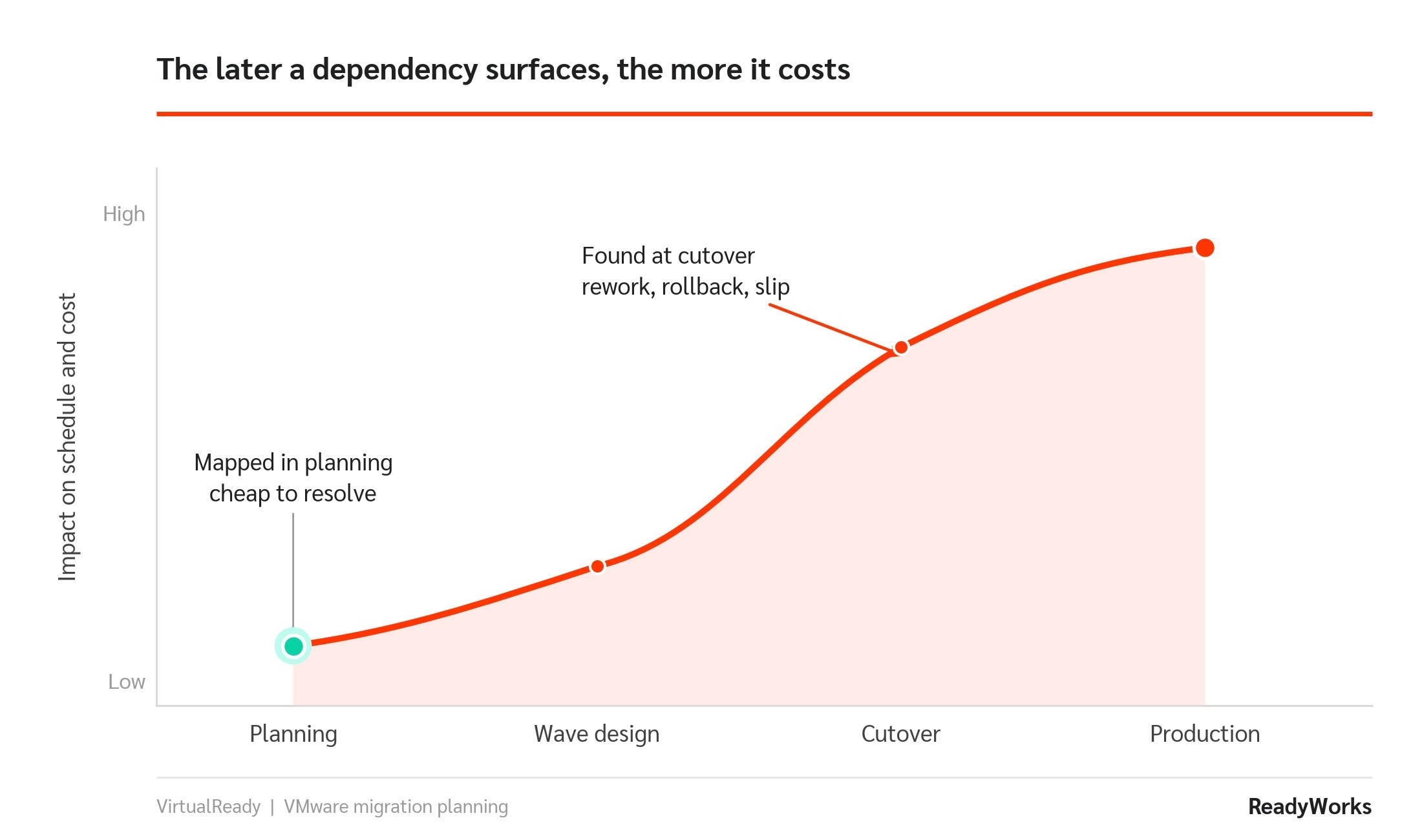
Undiscovered dependencies are the most expensive surprise in a migration. Roughly 73 percent of migrations overrun their schedule on dependencies that were never mapped, a figure we break down in our 7 Best VMware Migration Platforms for 2026 guide. The rule of thumb is simple. Dependencies you surface during planning are cheap to handle. Dependencies you discover at cutover are not.
Know your migration type before you map
Before you map anything, get clear on what kind of move you are making, because the destination shapes the dependency picture. VMware describes cloud migration as shifting IT resources away from private servers and on-premises data centers toward public cloud architecture. It describes workload migration more narrowly, as moving a single workload, usually a program or a service, from one infrastructure environment to another.
Most enterprise programs in 2026 are a blend. Some workloads move to public cloud, some move to on-premises Nutanix, and many stay hybrid for a while. Whatever the mix, the dependency map is what tells you which workloads can move together and which cannot. This is where ReadyWorks improves the starting point. VirtualReady maps dependencies across whichever destination you choose, so a hybrid program does not fracture into separate, disconnected plans for each target.
Step 1: Centralize dependency data in one source of truth
You cannot map dependencies that live in five different systems. In most enterprises, the raw data is scattered across vCenter, RVTools exports, a ServiceNow CMDB, storage arrays, and one or more clouds. Each source tells part of the story, and none of them agrees perfectly with the others. The first job is to pull those sources into one normalized view.
The ReadyWorks VM Accelerator turns raw data from VMware, RVTools, or Nutanix Collector into a clear, real-time inventory in minutes. From there, VirtualReady connects vCenter, ServiceNow, Nutanix, storage, and major clouds into a single source of truth, scores data quality, and flags the conflicts between sources that would otherwise surface at the worst possible moment.
Step 2: Map relationships, not just virtual machines
An inventory tells you what exists. It does not tell you what talks to what. A tool like RVTools shows virtual machines in isolation, which is useful for a headcount but dangerous for sequencing. A VM rarely lives alone. It connects to databases, authentication services, file shares, and monitoring agents. Move the VM without moving or validating those relationships, and you get a system that boots but does not work.
Dependency mapping fixes this by surfacing those connections, so you move applications rather than isolated machines. VirtualReady goes a step further and enriches each connection with the context that makes a wave plan defensible: application owners, maintenance windows, and business service mapping.
Step 3: Model waves against real capacity
With a clean, connected map, you can model waves instead of guessing at them. Group workloads into bundles based on application boundaries, business units, or infrastructure tiers, then give each bundle a readiness score that updates as remediation and approvals progress. Schedule the bundles into waves that respect real network capacity and real change windows, not an idealized calendar.
This is migration wave modeling done against reality. Each wave is scoped so dependent systems move together and any problem stays contained to a small blast radius, which is the whole point of waves over a single big-bang cutover.
Step 4: Align cross-team scheduling and communications
Here is the gap that quietly derails programs. The schedule and the communications usually live in separate systems, a plan in a spreadsheet and updates over email. Change a wave, a window, or a sequence, and the two fall out of step. At enterprise scale, keeping them aligned by hand is not realistic.
The fix is to generate communications from the same plan that drives the schedule, so a change to one updates the other automatically. VirtualReady runs IT migration scheduling and stakeholder communications off that shared plan. It automates approvals, change tickets, and notifications, and it records who was told what and when, which gives you a clean audit trail for regulated environments.
Keep the dependency map live
One thing a point-in-time export cannot give you is a map that stays true. Estates change during a program that can run 18 to 48 months, as covered in our guide on preventing VMware migration delays, and a dependency snapshot taken in month one is stale by month three. Forrester guidance, referenced in our analysis of migrations that stalled, stresses that live, maintained inventory connections, not one-time snapshots, are the foundation of a program that executes without constant re-scoping. The VM Accelerator connects directly to vCenter and keeps inventory normalized in real time, so the map you plan from is the map that is actually true on cutover day.
How ReadyWorks improves each planning step:
|
Migration planning step |
Where it commonly breaks down |
How ReadyWorks improves it |
|
Centralize data |
Inventory scattered across vCenter, RVTools, CMDB, storage, and clouds, with no source agreeing |
VM Accelerator normalizes inventory in minutes; VirtualReady unifies sources into one scored source of truth |
|
Map dependencies |
Tools show VMs in isolation, so relationships stay hidden until cutover |
VirtualReady surfaces relationships and enriches them with owners, windows, and business context |
|
Model waves |
Waves sized by gut feel, ignoring network capacity and change windows |
Bundles with readiness scores, waves modeled against real capacity and real change windows |
|
Schedule and communicate |
Plan and messaging in separate systems, drifting out of sync on every change |
Schedule and stakeholder communications run off one plan, with automated approvals, tickets, and audit trail |
|
Keep the map live |
Point-in-time snapshots go stale over a multi-year program |
Live vCenter connection keeps inventory current through cutover |
Plan Safer Waves With VirtualReady
Safer VMware migration waves in 2026 come down to sequence and discipline. Build one centralized, living view of your dependencies, then run scheduling and communications from it. The January guide showed you how to close dependencies before a wave. This one shows you how to build the foundation underneath every wave.
See how VirtualReady does this on your own estate. Visit our VMware migration page to explore the platform, or contact us to speak with a migration specialist who can walk through your environment.